


myPhonak
4.57.23K Reviews
App Specs
- Version
- 7.5.2
- Updated On
- License
- Free
- Downloads
- 1,000,000+
- Developer
- Sonova AG
- Categories
- Medical
- Platform
- Android, iOS
Screenshots
 Analysis by AppCompare
I think the key question with a hearing-aid app is whether it makes everyday adjustments easier without turning listening into another task to manage. That is where myPhonak makes the most sense: it is a companion for compatible Phonak hearing aids, not a replacement for the hearing aids themselves or for care from a hearing professional. I would consider it if I wanted to make practical changes from my phone, check hearing-related activity, or handle some follow-up without making every adjustment in person.
It is a free medical app from Sonova AG, available for Android and iOS. Its average rating is 4.5 from around 121,000 ratings, and it has over a million installs. Those figures suggest that many people find it useful, but they do not tell me whether it will suit a particular person: the important first check is whether the hearing aids I use are compatible and whether I actually want phone-based controls.
Start with the decision that matters most
I would decide based on my routine rather than on the length of the feature list. If I often move between quiet rooms, busy public places, and conversations with several people, being able to adjust settings on the phone could be genuinely convenient. If I rarely change anything after my hearing aids have been fitted, the app may add little to my day. Either way, it is worth thinking about whether I want to make small adjustments myself or prefer to leave them to my hearing care professional.
The app is rated for Everyone and runs on Android 8.0 or later. Its current version is 7.4.1, and it first appeared on April 16, 2018. I would still check the app’s current compatibility details against my specific hearing aids and phone before building a routine around it. The practical question is not simply whether the app installs, but whether the controls I need work with my devices.
Where the phone controls earn their place
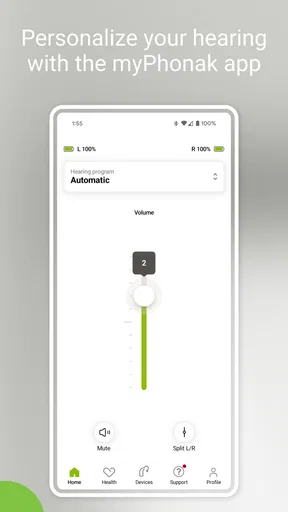
The strongest case for using the app is convenience at the moment I notice a problem. If a television sounds too loud while a family member is speaking, for example, I can use the phone to adjust the hearing-aid experience instead of waiting until my next appointment to mention it. Changing volume or selecting a program can be helpful when the listening situation shifts, while keeping those controls in one familiar place can make them less daunting than relying on tiny buttons.
That does not mean I would try to solve every listening difficulty by changing settings. A quick adjustment is useful when the environment changes, but repeatedly switching programs during one conversation can become distracting. I would treat the app as a way to make measured, reversible changes and notice what helps, rather than as a reason to keep chasing a perfect setting every few minutes.
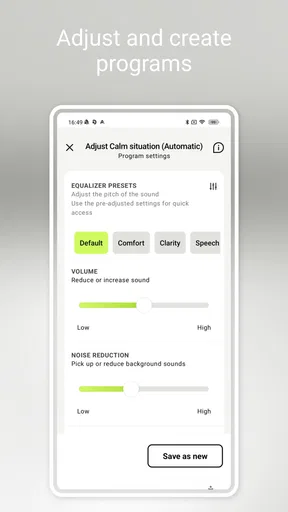
The personalized-program option is most useful when I can connect a saved setting to a situation I encounter regularly. A setting for a noisy café, for instance, is easier to remember than a collection of vague labels. I would give each saved program a clear purpose and try it in the same kind of setting before deciding it works. That small habit makes it easier to tell whether the change helped or whether the improvement came from a different seat, a quieter table, or a change in who was speaking.
Worth Reading Before You Choose

Baby Panda World Brings Quick Play to Modern Phones, but Its Game Library Feels Busy

ESPN’s Live Game View Makes Following Close Games Easier

QuizzLand Review: A Good Fit for Short Trivia Breaks, Not Every Player

Basketball Stars: Multiplayer Is Fast, but Can It Recover When Matches Go Wrong?

WEBTOON Turns Phone Updates Into a Better Reading Routine

Link to Windows Runs on Shared Habits, Not Social Feeds
Make hearing data useful, not another score
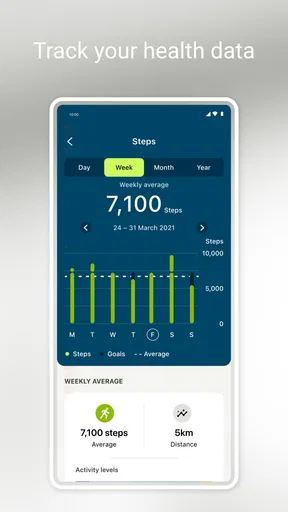
Usage tracking can help me notice patterns that are hard to recall later. If I arrive at a hearing-care appointment feeling that the aids were uncomfortable “sometimes,” a record of my use may give me a more concrete starting point for the conversation. It can also help me see whether I tend to take the aids out at a particular point in the day. I would use that information as context for a professional discussion, not as a diagnosis or a measure of whether I am doing hearing care correctly.
A practical tip is to jot down what was happening when a setting felt better or worse: the room, the people, and whether I was listening to speech or background sound. The app’s tracking and the notes together can make feedback more specific. Data alone cannot explain why a situation was difficult, so I would avoid treating a usage pattern as proof that a particular program or adjustment is medically right for me.
Remote help is valuable, with a few boundaries
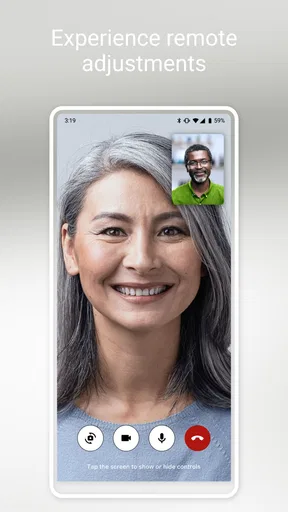
Remote support can reduce the effort of arranging help when I need an adjustment and cannot easily get to my hearing professional. That is especially useful for someone who lives far from a clinic, has a busy schedule, or notices an issue between planned visits. I would use it to explain a listening problem in the setting where it occurs and ask for guidance, rather than assuming that a remote session can replace every in-person check.
It is also worth separating professional support from instant self-service. Remote help depends on being able to connect and communicate clearly, so I would not count on it as an emergency solution or as a guarantee of immediate availability. If the issue is urgent, or if I have a sudden change in hearing or physical discomfort, an app setting is not a substitute for appropriate medical care.
Everyday use: a workday that changes by the hour
Imagine I start the morning at home, take a call on the way to work, and later meet a colleague in a crowded café. The useful workflow is not to open the app at every transition automatically. I would begin with the setup that works for my usual surroundings, make a small adjustment only when I notice a clear need, and remember which change helped. If the café remains difficult, that is a better detail to share with my hearing professional than simply saying that restaurants are hard.
At the end of the day, hearing-related activity can help me reflect on how consistently I used my aids and whether a problem followed me across different situations. I would not expect a phone display to capture the full quality of a conversation or how tiring it felt. The value is in turning a vague impression into a more useful account of my routine, especially when I am preparing for a fitting or follow-up.
How it compares with other ways to manage hearing aids
Compared with relying only on the hearing aids’ built-in controls, a phone app can put adjustments and saved programs in a more familiar interface. That is a meaningful advantage for someone who prefers a visual control panel or finds small physical controls awkward. The trade-off is that using the phone means keeping it nearby and being comfortable navigating an app; if I want a quick change without reaching for a phone, the controls on the aids may be the more natural choice.
Compared with a general health or activity tracker, this app’s purpose is specifically tied to Phonak hearing aids and hearing-related use. A broader tracker may suit someone who wants an all-purpose picture of daily activity, but it is not the same tool for adjusting hearing aids or contacting a hearing care professional. Conversely, if I do not use compatible Phonak devices, a hearing-aid app designed for my own brand is the more sensible place to start.
There is also a real choice between self-management and professional-led adjustments. The app makes small changes and ongoing observation more accessible, but someone who prefers not to manage settings may be happier asking their clinician to keep the setup simple. People who are still learning how their hearing aids respond should take changes gradually and ask for help when they cannot tell which setting is appropriate.
What may feel awkward, and how to avoid it
The main friction is that an app can only be useful when its controls match the devices and the person using them. Compatibility should come before download, and an unfamiliar interface can still feel like extra work even when it is designed to be straightforward. I would explore the controls in a quiet, low-pressure moment rather than trying to learn them while crossing a busy street or sitting down for an important conversation.
Another trade-off is attention. Looking at a phone to alter hearing settings can interrupt a conversation, and too many custom programs can make it harder to remember which one to choose. I would keep only the options I have a clear reason to use and name or associate them with familiar situations. If I find myself checking the app constantly without making a meaningful improvement, that is a sign to simplify the setup or discuss it with my hearing professional.
Because the app includes remote support and hearing-related information, I would also take a moment to review its current in-app explanations and settings before relying on either. People may reasonably want to understand how their information is handled and what a remote session involves. I would make those choices deliberately rather than assuming that every feature needs to be enabled for basic adjustments to be useful.
Who I would recommend it to
I would recommend it most to someone who already uses compatible Phonak hearing aids, likes having practical controls on a phone, and wants to bring clearer observations to hearing-care conversations. It is especially appealing if daily listening conditions vary or reaching a professional in person takes effort. The free price makes it easy to consider, though the real value still depends on device compatibility and whether its tools fit the way I prefer to manage my hearing.
I would skip it, or at least avoid expecting much from it, if I use another hearing-aid brand, do not want to adjust settings from a phone, or rarely need anything beyond the setup already provided. I would also not choose it as a stand-alone solution for hearing concerns: its role is to support use of compatible aids and communication with a hearing professional, not to replace diagnosis, fitting, or medical advice.
First Impressions and Features
When you first open the myPhonak app, you’re greeted with a clean and intuitive interface. It’s pretty straightforward, which is a relief because who wants to mess around with complicated settings, right? The app is designed to give you control over your Phonak hearing aids in a way that’s both accessible and user-friendly.
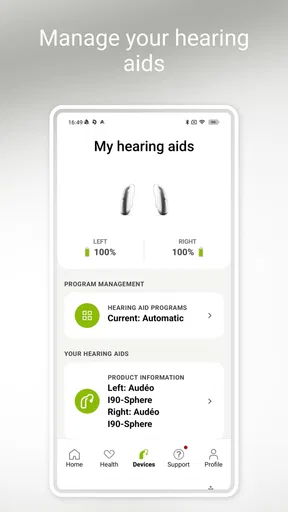
The app’s main features include adjusting volume levels, changing programs, and even accessing remote support from your hearing care professional. It’s like having a mini control center right in your pocket. The ability to fine-tune your hearing experience is a game-changer, especially for those who are always on the move.
Personalization at Its Best
What I found super interesting is the personalization aspect. You can create customized programs for different environments, whether you’re at a bustling café or chilling at home. The app allows you to save these settings, so you can switch between them without a hitch.
There’s also a nifty feature that lets you track your hearing aid data, giving you insights into your usage patterns. It’s like having a fitness tracker, but for your ears! If you’re someone who loves data and analytics, this will be right up your alley.
Remote Support and Updates
One of the standout features of the myPhonak app is the remote support option. Imagine having a direct line to your audiologist without leaving your house. With just a few taps, you can have a live session where adjustments are made in real-time. This is particularly useful if you’re experiencing issues and need immediate assistance.
Plus, the app ensures your hearing aids are always up-to-date with the latest firmware. Automatic updates mean you’re always benefiting from the latest tech advancements without having to do anything manually. Convenience at its finest!
Usability and Accessibility
Let’s talk about usability. The app is designed to be accessible for all users, including those who might not be tech-savvy. The layout is intuitive, and the instructions are clear, so there’s no fumbling around trying to figure out what does what. It’s perfect for anyone who wants a seamless experience without a steep learning curve.
Moreover, the app supports multiple languages, making it a global solution for Phonak users everywhere. No matter where you are in the world, you can easily navigate and adjust your hearing aids to suit your needs.
Final Thoughts
All in all, the app is a robust tool that enhances your hearing aid experience. With its range of features, from personalization to remote support, it’s clear that Phonak has put a lot of thought into making this app both functional and easy to use. If you’re looking to take control of your hearing aid experience, this app might just be your new best friend.
Ready to give it a try? You can download it from the App Store or Google Play and start exploring all the ways it can make your life a bit easier. Happy hearing!
Pros
- User-friendly interface for easy navigation.
- Customizable settings for personalized hearing.
- Real-time audio adjustments available.
- Seamless Bluetooth connectivity.
- Comprehensive hearing aid support.
Cons
- Limited features in the free version.
- Occasional Bluetooth connection issues.
- Requires frequent app updates.
- Initial setup can be time-consuming.
- Battery consumption may be high.
FAQs for myPhonak
What features does the myPhonak app offer?
The myPhonak app provides a comprehensive suite of features designed to enhance hearing aid functionality. It offers remote control, allowing users to adjust volume and program settings. Users can also access personalized hearing settings, get real-time support from audiologists, and track hearing progress. The app is compatible with most Phonak hearing aids.
Is the myPhonak app compatible with all smartphones?
The myPhonak app is compatible with both Android and iOS devices. However, it requires specific operating system versions: Android 6.0 or later and iOS 12.0 or later. Users should ensure their devices meet these requirements for optimal performance and to access all app features without any issues.
How user-friendly is the myPhonak app?
The myPhonak app is designed with user-friendliness in mind. It features an intuitive interface that simplifies navigation. Users can easily access hearing aid controls, view battery status, and manage appointments with audiologists. Additionally, the app provides guided tutorials to help new users get familiar with its functionalities.
What kind of support does the myPhonak app provide?
The myPhonak app offers robust support features, including remote assistance from audiologists. Users can schedule virtual consultations and receive real-time adjustments to their hearing aids. The app also includes troubleshooting guides and FAQs to help resolve common issues, ensuring users get the most out of their hearing aids.
Are there any privacy concerns with using the myPhonak app?
Phonak takes user privacy seriously and implements stringent security measures in the myPhonak app. Personal data is encrypted and used solely for improving user experience and providing support. Users have control over their data and can manage privacy settings within the app. It's advisable to review the privacy policy for detailed information.


